
You will see the main Profile screen displaying your name, email, and various management sections
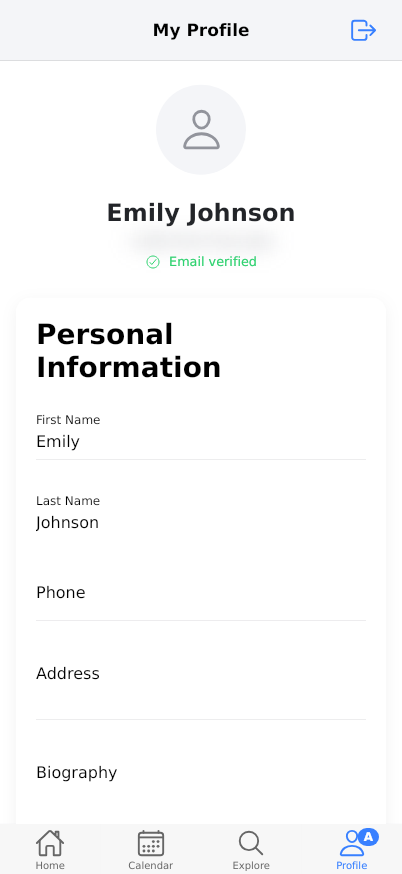
The Profile section in Reserving allows you to manage your personal information, preferences, security settings, and account features. This comprehensive guide covers all aspects of your profile management including personal details, notification preferences, security settings, and exploring premium features. You can also access application modes and manage your account deletion from this section.
Prerequisites
- A valid Reserving account
- Active internet connection
- Access to your registered email address
- Mobile device with Reserving app installed
- Basic understanding of navigation within the app
Steps
Progress: 0 of 22 steps
1
Navigate to the Profile tab
2
Review your profile header information
3
Update Personal Information by tapping 'Update Profile'
4
Enter your First Name in the designated field
5
Enter your Last Name in the designated field
6
Enter your Phone number in the phone field
7
Enter your Address in the address field
8
Write your Biography in the biography field
9
Tap 'Save Preferences' in the Preferences section
10
Toggle 'Email Notifications' on/off
11
Toggle 'Push Notifications' on/off
12
Toggle 'Notify before reservation' on/off
13
Select your preferred Language
14
Tap 'Change Password' in the Security section
15
Explore 'PRO' features section
16
Tap 'Try Free for 1 Month'
17
Tap 'Create space'
18
Tap 'Send Suggestion' in Feedback section
19
Switch between 'Modo Usuario' and other application modes
20
Tap 'Delete My Account' in Danger Zone
21
Tap any Legal Information link (Privacy Policy, Terms of Service, EULA)
22
Navigate to other tabs using bottom navigation
Interactive States
Main Profile View
The default profile screen showing all management sections including personal information, preferences, security, PRO features, and account settings
- View profile summary
- Navigate to edit modes
- Access premium features
- Manage account settings
Edit Profile Mode
Interactive state where personal information fields become editable for modification
- Edit text fields
- Save changes
- Cancel edits
Preferences Management
State where notification and language preferences can be configured and saved
- Toggle notification settings
- Select language
- Save preference changes
Home Tab View
The main dashboard showing upcoming reservations, favorites, vouchers, and recent activity
- View reservations
- Manage favorites
- Check vouchers
- Browse recent organizations
Calendar View
Weekly calendar interface showing available time slots and reservation schedule
- View daily schedule
- Navigate weeks
- Check time availability
Explore View
Discovery interface showing popular venues, nearby locations, and new spaces
- Browse venues
- Filter by location
- View pricing
- Make reservations
Tips
- Keep your phone number updated to receive important reservation reminders and notifications
- Enable 'Notify before reservation' to avoid missing your booked time slots
- Use the biography field to share relevant information with organizations you frequently book with
- Regularly check your email verification status to ensure you receive all communications
- Explore the free Pro trial to experience premium features before committing
- Use the 'Más cercanas' filter in Explore to find venues closest to your current location
- Save your favorite organizations for quick access in the Home tab
- Check your voucher balances regularly to avoid expiration of unused credits
- Update your language preference if traveling to regions with different primary languages
- Use the calendar view to plan your week and avoid booking conflicts
Warnings
- Account deletion is permanent and will remove all your reservation history and personal data - this action cannot be undone
- Email verification is required for certain features and to ensure you receive important notifications
- Changing your password will log you out of all devices and require re-authentication
- Free Pro trial will automatically convert to paid subscription if not cancelled before the trial period ends
- Push notifications require app permissions to be enabled in your device settings
- Phone number format must be valid international format for proper functionality
- Biography content should be appropriate and professional as it may be visible to organizations
- Address information is used for location-based services and should be accurate for best results
Troubleshooting
FAQ
What is the purpose of the Profile section? The Profile section is your personal management hub where you can update your information, configure preferences, manage security settings, explore premium features, and control your account settings.
Why is email verification important? Email verification ensures you receive important reservation confirmations, reminders, and security notifications. It also enables full access to all app features.
What are Reserving Pro features? Reserving Pro offers premium tools including selling vouchers to customers, smart access control for facilities, and payment collection capabilities for businesses and organizations.
How does the 'Notify before reservation' feature work? This feature sends you a reminder notification before your reservation start time, helping you avoid missing your booked slots. The timing can typically be configured in settings.
What happens when I delete my account? Account deletion permanently removes all your personal data, reservation history, preferences, and any associated information. This action cannot be reversed.
What is 'Modo Usuario' (User Mode)? User Mode is designed for individuals who want to make and manage their own reservations. Other modes may be available for business owners or administrators.
How do I create a space or organization? Tap 'Create space' to start the process of setting up clubs, rooms, centers, or professional profiles where others can make reservations.
What should I include in my biography? Your biography can include information relevant to organizations you book with, such as membership details, special requirements, or professional background that might be helpful for your reservations.
How do vouchers work in Reserving? Vouchers are credit packages you can purchase from organizations, allowing you to make multiple reservations without individual payments. They display remaining uses in your Home tab.