
Navigates to the Explore screen showing available spaces near your current location
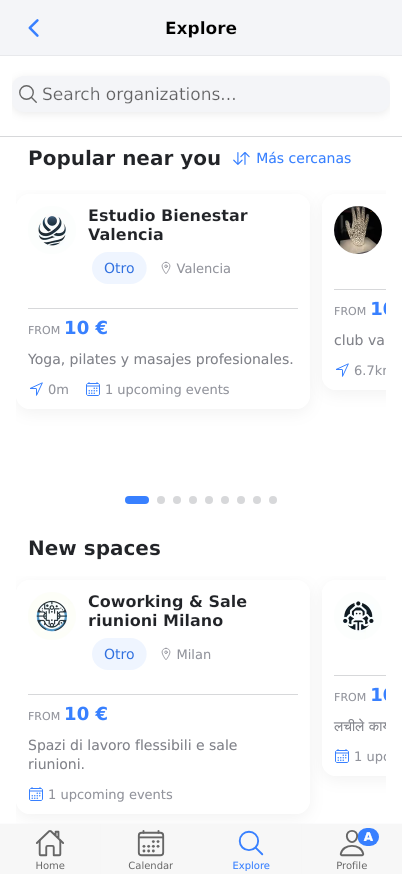
The Explore tab is your central hub for discovering available spaces, venues, and clubs near you. Browse through various categories including wellness studios, sports clubs, coworking spaces, and community centers. View pricing, distance, and upcoming events to find the perfect space for your needs.
Prerequisites
- Reserving account registration
- Location services enabled on your device
- Internet connection
- Basic understanding of your reservation needs (date, time, activity type)
Steps
Progress: 0 of 9 steps
1
Tap the 'Explore' tab in the bottom navigation bar
2
Scroll through the 'Popular near you' section
3
Tap 'Más cercanas' (Closest) filter
4
Review space details including name, category, location, and pricing
5
Check 'upcoming events' and 'bookings this month' indicators
6
Browse the 'New spaces' section
7
Tap on any space card to view detailed information
8
Use the search functionality (indicated by 'explore.search' i18n key)
9
Navigate to other tabs using bottom navigation
Interactive States
Default Explore View
Main exploration screen showing spaces organized by proximity with detailed cards showing name, category, location, pricing, distance, and activity indicators
- Scroll to browse
- Tap space cards for details
- Use search
- Apply filters
- Navigate to other tabs
Calendar View
Weekly calendar interface showing time slots from 0:00 to 23:00 across Monday through Sunday, with 'Today' navigation and empty reservation slots
- Navigate between dates
- View time slots
- Create new reservations
- Manage existing bookings
Profile View
User profile management screen with personal information, preferences, security settings, Pro features promotion, and account management options
- Update profile information
- Manage notifications
- Change language
- Upgrade to Pro
- Create new spaces
- Delete account
Home Dashboard
Main dashboard showing active organizations, upcoming reservations, favorites, vouchers, and recent activity with quick reservation options
- View upcoming reservations
- Manage favorites
- Use vouchers
- Make quick reservations
- Navigate to explore
Tips
- Enable location services for accurate distance calculations and relevant local recommendations
- Spaces with more 'upcoming events' and 'bookings this month' are typically more reliable and popular
- Use the distance indicators to find spaces that minimize travel time
- Check multiple spaces in the same category to compare pricing and features
- Bookmark frequently used spaces by adding them to your Favorites for quick access
- International spaces are available if you're traveling or looking for specific cultural experiences
- Monitor 'New spaces' regularly to discover recently added venues before they become popular
Warnings
- Prices shown are starting prices only - actual cost may vary based on duration, time, and additional services
- Distance calculations rely on your device's location services - ensure they're enabled for accuracy
- Upcoming events indicators show scheduled activities but don't guarantee availability for your desired time slot
- Some spaces may have minimum booking durations or advance notice requirements not shown in the main listing
- International spaces may have different cancellation policies or booking requirements
Troubleshooting
FAQ
What does 'FROM 10 €' mean? This indicates the starting price for the most basic service or shortest time slot. Actual pricing may be higher depending on duration, specific services, time of day, or additional features.
How is distance calculated? Distance is calculated from your current device location to the space's physical address using GPS coordinates. The app shows meters (m) for nearby spaces and kilometers (km) for farther locations.
What do the different space categories mean (Otro, Club, Comunidad)? Otro: Miscellaneous/other spaces | Club: Membership-based organizations | Comunidad: Community centers and neighborhood associations. Each category may have different booking policies and membership requirements.
What does 'upcoming events' indicate? This shows how many scheduled activities or bookings are coming up at that space. Higher numbers typically indicate active, popular venues with regular programming.
Why do some spaces show 'bookings this month'? This indicates how many reservations you personally have made at that space during the current month. It helps you track your usage patterns and favorite venues.
Can I book spaces in different countries? Yes, Reserving supports international spaces as shown in the listings. However, be aware that pricing, cancellation policies, and booking requirements may differ from local spaces.
How do I find spaces for specific activities like yoga or tennis? Use the search functionality or browse through the descriptions. Spaces are categorized by their primary activities, which are mentioned in their descriptions.