
You will see a list of organizations matching your search criteria with sorting options at the top
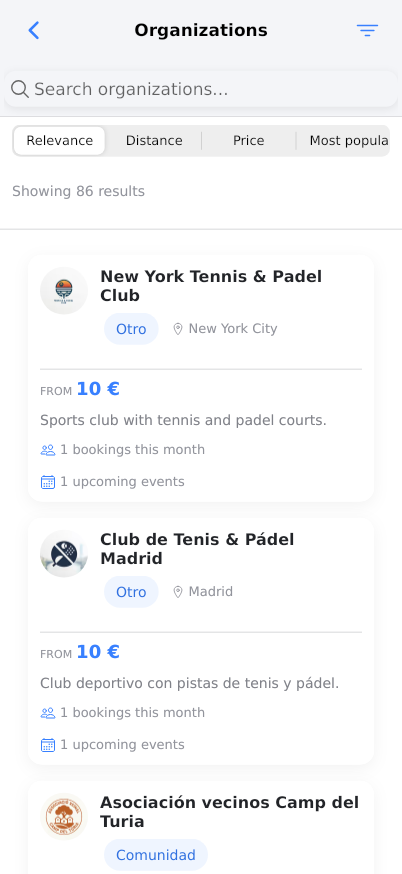
The Search Results page displays organizations available for reservation based on your search criteria. You can view detailed information about each organization, filter results by different sorting options, and see availability metrics. This page helps you find the perfect venue or service for your needs.
Prerequisites
- Active Reserving account with login credentials
- Completed search with valid location or organization type criteria
- Stable internet connection
- JavaScript enabled in browser
- Basic understanding of reservation concepts
Steps
Progress: 0 of 15 steps
1
Navigate to the Search Results page
2
Review the page header showing 'Organizations' and breadcrumb navigation
3
Click the 'Relevance' sorting option
4
Click the 'Distance' sorting option
5
Click the 'Price' sorting option
6
Click the 'Most popular' sorting option
7
Review the results count showing 'Showing X results'
8
Click on any organization card to view details
9
Review the organization type label (e.g., 'Otro', 'Comunidad', 'Club')
10
Check the location information under each organization name
11
Review the pricing information showing 'FROM X €'
12
Read the organization description text
13
Check the 'X bookings this month' metric
14
Check the 'X upcoming events' metric
15
When Distance sorting is active, review the distance measurements
Interactive States
Default Results View
Initial view showing all search results sorted by default criteria with comprehensive organization information
- Sort by relevance
- Sort by distance
- Sort by price
- Sort by popularity
- View organization details
Distance Sorted View
Results organized by proximity to search location, showing exact distance measurements for nearby organizations
- See distance metrics
- Compare nearby options
- Switch to other sorting methods
Relevance Sorted View
Results organized by search relevance algorithm, prioritizing best matches to your search criteria
- View most relevant matches
- Access algorithm-prioritized results
- Switch sorting methods
Tips
- Use multiple sorting options to compare organizations from different perspectives
- Check both 'bookings this month' and 'upcoming events' to gauge organization activity
- The 'FROM' price is the starting rate - check organization details for full pricing
- Distance sorting is most useful when location proximity is your primary concern
- Relevance sorting combines multiple factors for overall best matches
- Popular organizations often have more reviews and established services
- Organizations with recent bookings indicate active and reliable services
- Multiple language support shows international or diverse client capability
- Regularly check back as new organizations may be added to the platform
- Use specific search terms initially to get more relevant results from the start
Warnings
- Prices shown are starting rates only - final costs may be higher
- Distance measurements are straight-line and may not reflect actual travel routes
- High booking numbers don't guarantee availability for your desired dates
- Some organizations may have minimum booking requirements not shown in search results
- Always verify organization details and policies before making reservations
- Search results may change as new organizations join or existing ones update their profiles
Troubleshooting
FAQ
What does 'Relevance' sorting mean? Relevance sorting uses an algorithm that considers how well each organization matches your search terms, combined with factors like popularity, user ratings, and booking history to show you the most appropriate results first.
How is distance calculated? Distance is calculated as the straight-line distance in kilometers or meters from your specified search location to each organization's physical address. This may not reflect actual travel routes or time.
What does 'FROM X €' mean? This indicates the starting price for the most basic reservation option at that organization. Actual costs may be higher depending on duration, additional services, peak times, or specific requirements.
Why do some organizations show 'bookings this month' while others don't? This metric shows recent activity. Organizations without this metric may be new to the platform, may not have public booking data, or may have had no bookings in the current month.
What's the difference between 'bookings this month' and 'upcoming events'? 'Bookings this month' shows reservations that have already occurred in the current month, indicating recent activity. 'Upcoming events' shows scheduled future activities, indicating current availability and planning.
Why are some organization descriptions in different languages? Reserving supports international organizations, so descriptions appear in the language used by each organization. The platform automatically displays information as provided by the organization owners.
How often are search results updated? Search results update in real-time as organizations join the platform, update their profiles, or change availability. The system continuously refreshes to show current information.
Can I save organizations from search results for later? While this specific view doesn't show save functionality, you can bookmark organizations by visiting their detailed pages where saving options are typically available.